


At Techtide Solutions, we still treat AJAX as one of those “quiet primitives” of the web: not glamorous, rarely marketed, but constantly present in the products people depend on. Plenty of modern stacks wrap it in abstractions—hooks, query clients, reactive streams—yet the underlying idea remains the same: a page can communicate with a server without surrendering the whole user experience to a full reload.
Market pressure is part of why this pattern refuses to die. In a world where Gartner expects worldwide IT spending to reach $6.08 trillion in 2026, teams naturally scrutinize every friction point that wastes attention, time, or compute. Responsive UX is not “nice to have” when your software sits directly on the revenue path, whether that path is checkout, onboarding, scheduling, claims intake, or internal operations.
What is AJAX?
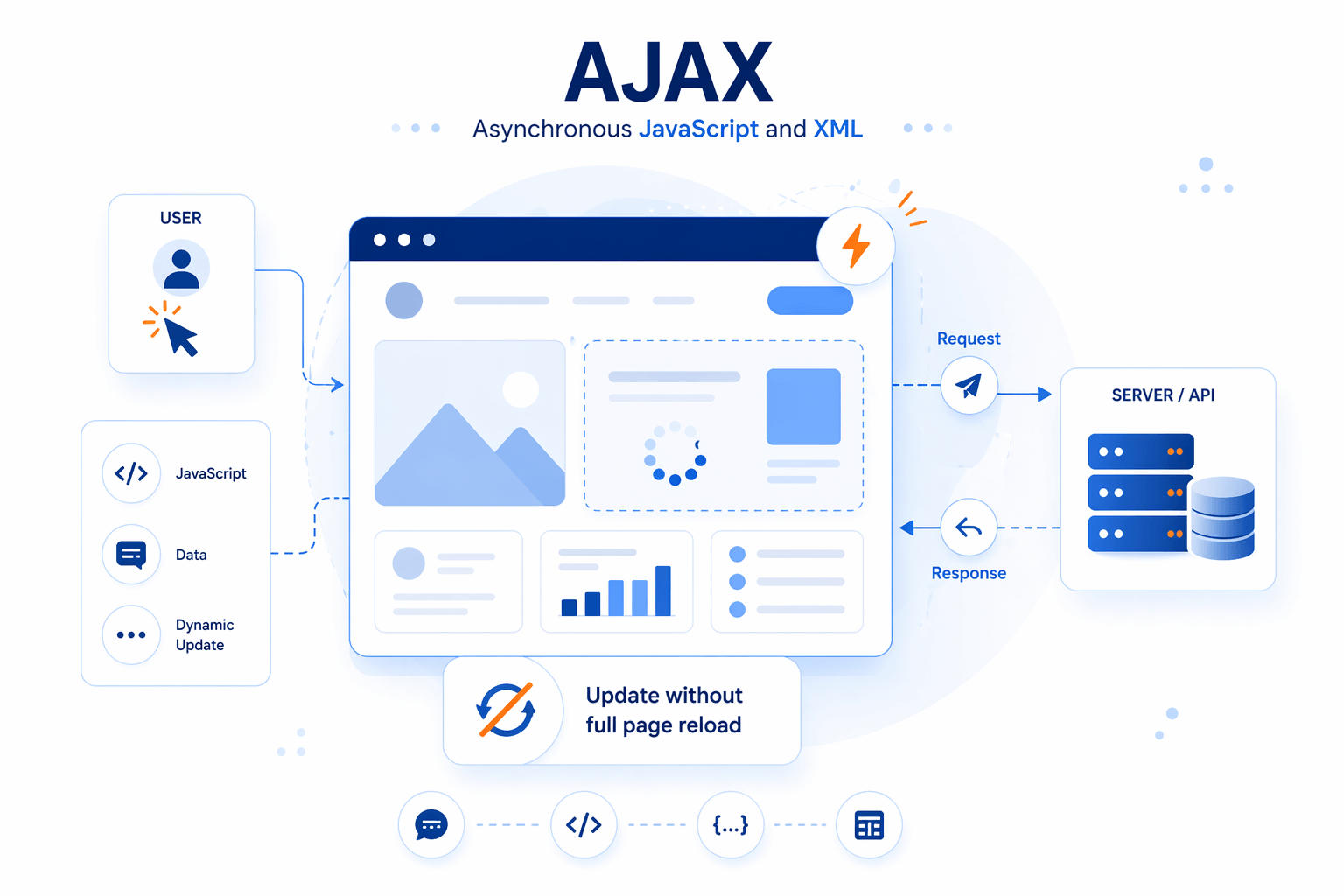
Alongside budgets, architecture has shifted as well. Gartner also projects that 90% of organizations will adopt hybrid cloud through 2027, which—practically speaking—means web applications increasingly talk to a mesh of APIs across boundaries. Under that reality, asynchronous requests aren’t an optional trick; they’re a coping strategy for distributed systems.
So, when people ask us “What is AJAX?” we answer in a slightly contrarian way: it’s less a feature than a philosophy. The philosophy is this—users should keep moving while the network does its work. Everything else is implementation detail, tradeoff management, and good engineering hygiene.
1. Asynchronous JavaScript and XML: a technique for more responsive web applications
AJAX is shorthand for “Asynchronous JavaScript and XML,” but the acronym is more historical than literal. In our experience, what developers truly mean by AJAX is “a browser-driven request made from JavaScript that updates the UI when it completes.”
Asynchrony matters because networks are slow, variable, and occasionally unreliable. Instead of freezing the user’s flow until the server responds, AJAX lets the UI remain interactive: the page can keep accepting input, rendering animations, and preserving scroll position while data arrives in the background. From a product angle, that responsiveness is not cosmetic—it changes how confident users feel while they work.
2. Update parts of a page without reloading the whole page
A full page reload is a sledgehammer: it tears down state, re-fetches assets, and forces the browser to reconstruct the world. AJAX is the scalpel: it updates only the region that actually changed.
In Techtide Solutions projects, the “region” is often more nuanced than a single div. It can be a table body refreshed after filtering, a small badge showing unread notifications, or a form error banner displayed after server validation. The key pattern is selective invalidation: update what’s stale, keep what’s still trustworthy, and avoid surprising the user with a sudden reset of focus or navigation context.
3. Read data from a web server after a page loads and send data in the background
AJAX is not just about reading; it’s also about writing. The browser can send data to the server without forcing a navigation event, which is why we see AJAX everywhere in autosave, “like” buttons, draft comments, and background uploads.
From an engineering standpoint, this introduces a subtle shift: the server becomes a collaborator rather than a destination. Instead of “submit form, go to next page,” we get “emit intent, receive acknowledgment, reconcile UI.” That reconciliation step—especially under latency or partial failure—is where many real-world apps either feel polished or feel fragile.
4. Data transport isn’t limited to XML: JSON and plain text are common
The “XML” in AJAX is a relic of the early web’s obsession with markup as a universal interchange format. Modern teams, including ours, overwhelmingly exchange JSON because it maps cleanly to JavaScript objects and plays well with typed schemas and API tooling.
Plain text still has a role when the payload is tiny or intentionally human-readable: returning an error message, a snippet of HTML, or a compact token. What matters isn’t the format; what matters is consistency. When formats drift, client logic grows branches, and branches eventually turn into bugs that only show up in production.
Recommended reading: How to Create a Custom Dialog by Angular Material Dialog: Setup, Data Flow, Configuration, and Styling
The AJAX request cycle: what happens from click to page update

1. Triggering events and creating an XMLHttpRequest object
An AJAX cycle usually starts with an event: a click, a keypress, a scroll threshold, or a component mounting. In older codebases, that event handler instantiates XMLHttpRequest directly; in newer ones, the handler may call a wrapper that ultimately uses either XHR or fetch under the hood.
On our teams, the first design question is rarely “How do we send the request?” Instead, we ask, “What user intent does this event represent?” That intent framing helps define idempotency, caching expectations, and retry behavior. A search suggestion request behaves differently from a payment submission, even if both are “just AJAX.”
2. Sending a request to the server and receiving the response asynchronously
After creation comes configuration: method, URL, headers, credentials behavior, and payload. Once the request is sent, the browser does what it does best—it multiplexes work: rendering, scripting, and network IO proceed without blocking each other in the simplistic way many people imagine.
Asynchrony is where user experience either stays smooth or falls apart. If the UI doesn’t communicate that work is happening, users double-click, re-submit, or abandon. If the UI overreacts—showing spinners everywhere—users feel punished for normal actions. Our preferred stance is restrained feedback: show progress where uncertainty exists, and keep the rest of the interface calm.
3. Using JavaScript to interpret the response and update the page via the DOM
When the response arrives, JavaScript parses it and decides what to do next. In a server-driven approach, the response may contain ready-to-render HTML fragments. In a data-driven approach, the response is JSON, and rendering is entirely client-side.
DOM updates are deceptively expensive when done naively. A common performance smell we encounter is “update by replacement”: removing a whole container and re-inserting it, which can break focus, reset scroll position inside nested panels, and cause layout thrashing. Targeted updates—patching the smallest necessary nodes, batching mutations, and preserving interactive state—make AJAX feel invisible in the best possible way.
4. ELI5 view: the page “asks for more data” without refreshing everything
Imagine a restaurant where you don’t have to leave the building every time you want more water. Instead, you raise your hand, the server brings a refill, and your conversation continues uninterrupted. That’s AJAX in plain language.
Business stakeholders often understand this metaphor quickly because it maps to customer patience. A full reload is like asking a customer to stand up and re-enter the store for each question. An asynchronous update is like a helpful associate who keeps the interaction flowing. The technical details matter, but the emotional effect—continuity—is why the technique keeps earning its place.
5. Handling responses with success and error callbacks
Success paths are straightforward: render data, update counts, transition state. Error paths are where applications reveal their maturity. Network failures, timeouts, and server validation errors all need different handling if we want the UI to remain trustworthy.
In our delivery practice, we treat error handling as a UX requirement, not a backend afterthought. Retries should be purposeful, not infinite. User messaging should be specific without leaking internals. Most importantly, state should not lie: if the server rejected an update, the UI must reflect that reality, even when optimistic rendering made the interface feel faster for a moment.
Recommended reading: CSS Text Outline Techniques for the Web
Core technologies used in AJAX

1. HTML or XHTML and CSS for presentation
AJAX does not replace HTML and CSS; it amplifies them. The browser still needs a baseline document structure to render, and CSS still defines how content behaves across layouts, breakpoints, and states.
In modern component systems, it’s easy to forget that “presentation” includes semantic correctness. When an AJAX update inserts content, headings must remain headings, lists must remain lists, and form controls must retain labels. Good semantics are not just for accessibility audits; they improve maintainability because the UI remains legible to both humans and tooling.
2. DOM for dynamic interaction and targeted updates
The DOM is the contract between the browser’s rendering engine and your JavaScript. AJAX uses that contract to place new information exactly where it’s needed, rather than relying on a navigation event to rebuild the tree.
In practice, DOM discipline separates robust applications from brittle ones. Tight coupling to fragile selectors, excessive reliance on innerHTML string concatenation, and uncontrolled reflows can turn a “small update” into a performance tax. Our preferred approach leans on predictable node boundaries, component encapsulation, and update patterns that preserve user focus and keyboard navigation.
3. XMLHttpRequest API for asynchronous browser-to-server communication
XMLHttpRequest is the original workhorse behind AJAX. Even when teams adopt fetch, XHR remains relevant because it still appears in older libraries, enterprise codebases, and certain edge cases involving progress events and legacy compatibility.
From a maintenance standpoint, the question is not “Is XHR obsolete?” but “Is the abstraction consistent?” A codebase that mixes raw XHR, fetch calls, and multiple third-party clients tends to grow multiple error-handling strategies. Standardizing request construction, timeouts, headers, and response normalization usually pays back quickly, especially when incident response depends on consistent logs and predictable failure modes.
4. JavaScript as the “glue” that coordinates requests and UI updates
JavaScript is the conductor: it decides when to request data, how to parse it, and how to reflect it in the UI. Frameworks can reduce boilerplate, yet the orchestration problem never disappears—it simply moves to a different layer.
In real products, the hardest part is not making a request; it’s managing state transitions. A request can be in-flight while the user changes filters, navigates to a different tab, or loses connectivity. Without careful cancellation, debouncing, and stale-response protection, the UI can “time travel,” showing old results after new intent has already been expressed.
5. Data interchange options: XML, JSON, and other formats
XML still shows up in enterprise integrations, document workflows, and legacy SOAP services. JSON dominates most modern REST-like APIs. Beyond those, we sometimes exchange CSV for export features, HTML fragments for server-rendered partials, or binary payloads for file handling.
Format choice should follow constraints. If clients are diverse—web, mobile, partner systems—schema-driven payloads help prevent drift. If the UI needs server-authoritative markup for consistent rendering, HTML fragments can be pragmatic. Our bias is to optimize for clarity: whichever format you choose, define it tightly, validate it reliably, and document it as a product interface rather than an incidental implementation detail.
Recommended reading: Angular vs React: How to Choose the Right Frontend Stack for Scalable Web Apps
A brief history of AJAX and standardization milestones

1. 2005: Jesse James Garrett coins the term Ajax
The term “Ajax” became popular when Jesse James Garrett named a pattern that had already been emerging: using background requests to make web interfaces feel like desktop software. Naming matters because it turns scattered tricks into a recognized approach, and recognition accelerates adoption.
From our perspective, the important historical takeaway is not nostalgia; it’s the realization that UX expectations can change faster than infrastructure. Once users experience uninterrupted interaction—typing, filtering, saving, continuing—they start to demand it everywhere. That demand is why AJAX-like behavior became a baseline even as the tooling ecosystem evolved beyond what early implementations looked like.
2. XMLHttpRequest progresses toward an official web standard and a living standard
In the early days, XHR behavior varied across browsers, and teams carried compatibility code like a permanent backpack. As standardization improved, the technique became less of a hack and more of an accepted part of the platform.
A “living standard” mindset also changed how we build: rather than waiting for rare, monolithic spec releases, the web platform evolves continuously. For teams shipping business-critical applications, this means two things. First, we must test across real browsers, not just rely on theory. Second, we should design progressive enhancement paths so that core workflows still function even when advanced behaviors degrade.
3. Evolution from XML-heavy patterns toward JSON-driven approaches
AJAX originally leaned on XML because it felt like the “serious” data format of the time. JSON rose with JavaScript-heavy front ends, REST-style APIs, and the practical desire to reduce parsing friction.
The industry shift was also cultural. Instead of treating the server as a page factory, many teams started treating it as an API provider. That move enabled richer clients, but it also created new responsibilities: versioning, backward compatibility, and careful security boundaries. In our builds, we treat API evolution as product evolution, because every JSON field is effectively part of the user experience once the UI depends on it.
Recommended reading: What Is HTML: Definition, Structure, And Modern Practice
AJAX use cases: where asynchronous updates improve UX
1. Autocomplete and search-as-you-type suggestions
Autocomplete is the classic AJAX demo because it makes latency visible: as the user types, the system predicts intent. Done well, it feels like the application is reading the user’s mind. Done poorly, it feels jumpy, irrelevant, or distracting.
Under the hood, we usually combine debounced requests with cancellation logic to avoid stale suggestions overwriting newer intent. Product teams also need guardrails: suggestions should respect privacy, avoid leaking sensitive history, and degrade gracefully when connectivity is weak. The best autocomplete systems feel effortless precisely because they work hardest to stay out of the way.
2. Form verification and inline validation before submission
Inline validation is where AJAX directly reduces frustration. Instead of submitting a form, waiting, and getting kicked back with errors, users can learn about issues at the moment they occur.
Even so, client-side checks are never enough by themselves. In our projects, we treat AJAX validation as advisory and server validation as authoritative. That dual-layer approach prevents inconsistent rules, stops malicious bypasses, and reduces support tickets caused by “it worked on my screen” misunderstandings. The UX win is real, but only if it’s backed by a consistent backend contract.
3. Chat functionality, live notifications, and ongoing content refresh
AJAX can power “near real-time” experiences through polling or long-polling, especially when full duplex protocols are unnecessary. Many internal tools still use periodic refresh because it’s simpler to operate than persistent connections.
In production environments, we watch for hidden costs: polling can create noisy traffic patterns, amplify load spikes, and complicate caching layers. When teams outgrow these patterns, technologies like WebSockets or server-sent events can take over. Still, AJAX remains a useful stepping stone, particularly when the business needs a pragmatic solution that fits existing infrastructure and monitoring.
4. Social feeds, voting, and rating systems that update instantly
Feeds and reactions are deceptively complex because they mix write actions (“like”) with read actions (updated counts, reordered lists). Users expect immediacy, and they also expect correctness.
Our typical recommendation is a careful blend of optimistic UI and server reconciliation. The interface can respond instantly to the click, but it must be prepared to revert or adjust if the server rejects the action. This is where engineering meets product ethics: an interface that pretends success when none occurred can quietly erode trust, even if the user cannot articulate why the app feels “off.”
Recommended reading: What Is React: A Clear and Practical Guide
Practical examples of AJAX in real applications

1. Google Autocomplete: real-time suggestions on the same page
Google’s autocomplete experience is a widely understood illustration of AJAX-style interaction: you type, and suggestions evolve without a page reload. Users rarely stop to think about the underlying request flow, which is exactly the point—AJAX is at its best when it’s invisible.
From a technical perspective, the lesson is about pacing and relevance. Autocomplete must manage request frequency, handle out-of-order responses, and keep the UI stable even when suggestions update rapidly. In our own products, we apply the same principles to internal search, inventory lookup, and knowledge-base discovery, because the pattern is broadly transferable.
2. Interactive maps and geospatial views: retrieving new data while users explore
Interactive mapping experiences demonstrate how partial updates keep exploration fluid. As users pan and zoom, the UI requests new tiles, markers, or overlays without resetting the entire application state.
Geospatial AJAX patterns also expose performance realities. Payload size matters, caching strategy matters, and the server’s query efficiency matters. When a viewport changes, naive backends may recompute too much, too often. In Techtide Solutions engagements, we often design bounding-box queries, response pagination patterns, and caching headers so that map exploration feels continuous rather than stuttered.
3. Live updates and notifications without interrupting the current page state
Notifications are a classic “small, frequent update” use case. The UI might refresh a badge count, add a row to an activity list, or reveal a subtle toast without disrupting what the user is currently doing.
Good implementations respect attention. If every update steals focus or moves layout unexpectedly, users lose their place. Accessibility considerations matter here too: screen readers may need live-region announcements, while keyboard users need predictable tab order. AJAX makes the update possible; careful UI design makes it humane.
Advantages, limitations, and when to learn AJAX

1. Benefits: enhanced interactivity, smoother UX, and reduced full-page reloads
The primary advantage of AJAX is experiential. Applications feel more like tools and less like documents. Instead of “page one, page two,” users experience a continuous workflow: search, refine, edit, confirm, continue.
From a business standpoint, smoother interaction tends to reduce abandonment and support burden. Fewer reloads also mean fewer chances for users to lose unsaved work. In our postmortems, we repeatedly see that perceived reliability is as important as raw reliability; AJAX, when done well, increases perceived reliability because the interface remains steady under change.
2. Performance tradeoffs: reducing bandwidth and server load by updating only what’s needed
AJAX can reduce bandwidth by avoiding repeated downloads of the same layout chrome, scripts, and static assets. Selective updates also allow caching strategies that focus on data rather than pages.
Tradeoffs appear quickly, though. An application that makes too many tiny requests can drown in overhead: connection setup, header bloat, serialization costs, and server concurrency pressure. In our engineering reviews, we look for the “request shape” that matches the product’s rhythm. Sometimes that means batching. Other times it means prefetching likely next data. The goal is not fewer requests at all costs; the goal is predictable, efficient interaction.
3. Limitations: complexity, browser compatibility concerns, and SEO challenges
AJAX increases application complexity because it introduces more states: loading, success, partial success, error, retry, stale, and canceled. Each state needs UX treatment and testing coverage.
SEO can also be tricky when crucial content only appears after client-side requests. Search engines have improved at executing JavaScript, yet relying on that behavior can be risky for marketing-critical pages. Our usual guidance is pragmatic: keep indexable content available through server rendering or pre-rendering, then layer AJAX on top for interaction. Progressive enhancement still earns its keep.
4. Security and reliability concerns: JavaScript dependency, visible client-side code, and common web vulnerabilities
AJAX doesn’t create new classes of security problems so much as it makes existing ones easier to trigger at speed. Client-side code is visible by design, which means endpoints, payload shapes, and error messages can become a map for attackers if teams are careless.
In secure builds, we assume the client can be tampered with. Authentication must be enforced server-side. Authorization checks must be consistent across endpoints. Input must be validated regardless of what the browser did. Meanwhile, common web vulnerabilities—XSS, CSRF, injection, and insecure direct object references—can show up in AJAX-heavy apps because the surface area grows as APIs multiply. Reliability risks also expand: a partial outage can break only one panel of the UI, creating confusing half-working experiences unless the app is designed for graceful degradation.
5. Learning path: prerequisites, practicing real examples, and building a small AJAX project
Learning AJAX is mostly about learning browser thinking. A solid foundation in JavaScript events, promises, and DOM manipulation makes the technique feel natural rather than mysterious.
For practice, we recommend building something small but real: a search box that queries an API, a form that validates fields against server rules, or a dashboard widget that refreshes its data while preserving user-selected filters. Along the way, the most valuable lessons come from edge cases: canceled requests, slow responses, and error messaging. Master those, and every modern framework becomes easier to reason about because you’ll recognize the underlying mechanics.
TechTide Solutions: custom AJAX-driven web apps tailored to your customers

1. Building responsive user experiences with asynchronous data loading and targeted UI updates
At Techtide Solutions, we treat responsiveness as a system property, not a UI trick. Achieving “fast feeling” interactions requires coordination across frontend state management, API performance, caching behavior, and error handling.
In delivery, we focus on targeted updates that respect user intent. That usually means preserving scroll position, maintaining keyboard focus, and avoiding layout shifts that make interfaces feel unstable. When an app must load data progressively, we design skeleton states and partial rendering so users can start acting before everything arrives. The best compliment we hear is silence—when users don’t notice the network at all.
2. Developing custom web app backends and APIs that cleanly support AJAX requests
AJAX succeeds or fails on API quality. Endpoints must be consistent, predictable, and secure, and they should expose the right level of granularity for the UI’s needs.
On backend work, we often emphasize contract clarity: stable response shapes, explicit error semantics, and permission checks that behave the same way across the surface area. Observability matters too. When a client reports “the page spinner never stops,” the team needs tracing and logging that can identify whether the failure is latency, auth, serialization, or a downstream dependency. Clean APIs make AJAX feel simple; messy APIs make it feel like a gamble.
3. Modernizing and extending existing sites with tailored solutions using the right AJAX patterns for your product
Not every organization can rewrite a site into a single-page application, and many shouldn’t. Modernization often means selectively applying AJAX where it produces the highest impact: search, filtering, inline edits, autosave, and partial refresh panels.
Our modernization approach is incremental and pragmatic. We identify friction points, design APIs that can serve both legacy and new interactions, and introduce asynchronous updates without breaking existing navigation or SEO-critical routes. Over time, those improvements can compound into a noticeably more fluid product without a risky “big bang” migration. When modernization respects business continuity, teams move faster with less fear.
Conclusion: what is ajax best used for today
1. Use AJAX when partial updates and uninterrupted interaction matter most
AJAX is best used when the user’s flow should not be interrupted: searching, filtering, editing, saving drafts, refreshing a panel, or confirming an action without losing context. In those moments, full reloads feel like a penalty, while partial updates feel like competence.
From our viewpoint, the enduring value of AJAX is that it encourages teams to think in “user moments” rather than “pages.” When the UI can evolve without navigation, product design becomes more flexible, and workflows can be shaped around how people actually work instead of how documents traditionally load.
2. Apply AJAX thoughtfully alongside maintainability, accessibility, SEO, and security needs
Good AJAX is not just asynchronous; it’s disciplined. Maintainability requires consistent request patterns and centralized error handling. Accessibility demands that dynamic updates remain perceivable and navigable. SEO often benefits from server-rendered foundations with AJAX enhancements layered on top.
Security, finally, must be explicit: every endpoint is an attack surface, every payload is untrusted, and every client assumption can be broken. If we were advising a team taking the next step, we’d ask a simple question: where would uninterrupted interaction create the most customer value, and what would it take to make that experience resilient enough to earn trust?

